


Grocery Shopping List -BudList
4.468.00 Reviews
App Specs
- Version
- 3.30
- Updated On
- License
- Free
- Downloads
- 10,000+
- Developer
- RMY Studio
- Categories
- Shopping
- Platform
- Android
Screenshots
 Analysis by AppCompare
I find a shared grocery list most useful when several people contribute at different times, rather than when everyone is standing in the same aisle. One person notices the last of the coffee is nearly gone; someone else remembers dinner ingredients on the way home. Grocery Shopping List - BudList is built around keeping those everyday shopping notes together, and that makes it worth considering for a household that wants a little more order without turning errands into a project.
That said, a list app only helps if the people using it agree on how to use it. I would keep one list for the next regular grocery run, add quantities or notes when a shorthand item could be misunderstood, and avoid treating it as a full household management system. Its appeal is practical: it can help capture what needs buying and give shoppers a clearer prompt once they reach the store.
A shared list works best with simple habits
For a realistic example, imagine I am planning a quick shop after work while another person at home is checking the pantry. A shared list can reduce the familiar round of messages asking whether we still need rice or which kind of cereal to buy. If the item needs a particular size or variety, a note is more useful than a vague entry. That small habit matters: a list is only as clear as the information people put into it.
I would also decide what “done” means in the household. Crossing off an item while shopping is useful for the person pushing the cart, but a shared routine should make clear whether checked items are simply completed for this trip or whether someone should review the list later. This is not a special feature claim; it is a practical way to prevent a useful list from becoming a mixture of current needs and old reminders.
Keep account and device expectations modest
BudList is a shopping app from RMY Studio, and its focus is narrower than a full family calendar or household organizer. The published app details identify it as a grocery-list and to-do-list app, but I would not assume that shared use automatically means separate profiles, permissions, or household roles. Before relying on a list across several people, check how it behaves on the devices you actually plan to use and agree on which list is the shared one.
That distinction is important in a home where a phone or tablet is shared. A list can be convenient for errands, but it is not a substitute for separate personal accounts or a way to manage who can see other information. I would keep entries focused on shopping and avoid putting private notes into a list that other household members may access. For a solo shopper, this boundary is simpler; for a shared device, it is worth being deliberate.
Age, trust, and everyday responsibility
The app has a Teen content rating, so it is not presented as an adults-only shopping tool. A teenager can use a list to remember ingredients, plan a small shop, or help with a household errand, while an adult can still review what is needed and set the budget for the trip outside the app if that is part of the family routine. I would treat it as a practical aid, not as a guarantee that purchases are approved or supervised.
Worth Reading Before You Choose

Flipboard Shows What News Apps Must Do Beyond the Feed

Switching to Android Auto Means Rethinking Your Driving Routine

Google Calendar Makes a Crowded Week Easier to Manage

Ludo King Makes the Most of the Minutes Between Plans

Baby Panda World Brings Quick Play to Modern Phones, but Its Game Library Feels Busy

ESPN’s Live Game View Makes Following Close Games Easier
Trust comes down to the household’s own expectations. If a young person is shopping independently, clear notes about brands, quantities, or spending limits can prevent avoidable confusion. If the shopper is not expected to make substitutions, say so before they leave rather than relying on a list app to enforce that rule. This kind of shared understanding is more reliable than assuming the software will handle family boundaries.
Using BudList for a calmer grocery routine
I use a grocery list most when the shopping happens in stages: I notice something is running low, add it before I forget, then check the list when I’m ready to leave. That simple habit can make a household shop feel less like a memory test. Next, I’d look at the practical boundaries of using one list across a home, especially when people share devices or have different expectations about what belongs there.
Initial Impressions
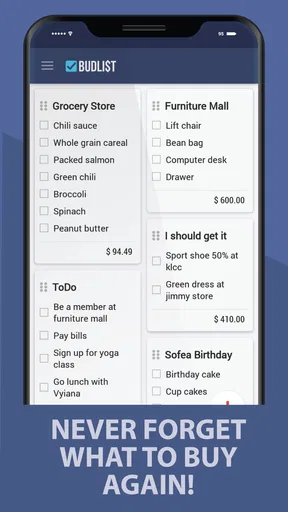
When I first downloaded BudList, I was immediately drawn to its clean and intuitive interface. Setting it up was a breeze, and within minutes, I was creating lists like a pro. The app allows you to add items manually or choose from a comprehensive catalog of grocery items. It’s not just about jotting down names; you can categorize items, set priorities, and even add quantities and notes. This is perfect for those of us who are meticulous planners.
Features That Stand Out
One feature that really hooked me was the ability to sync lists across devices. Imagine starting a list on your phone and having it instantly available on your tablet or even sharing it with family members. This makes collaborative shopping a piece of cake, especially if you’ve got a partner who’s more prone to spontaneous buys.
Another standout feature is the smart suggestions. The app learns from your shopping habits and starts recommending items you frequently buy. It almost feels like the app knows me better than I know myself sometimes! This is particularly handy for those staple goods you buy every week, like milk or eggs.
Usability and Design
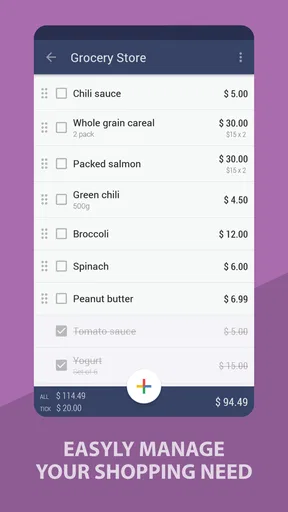
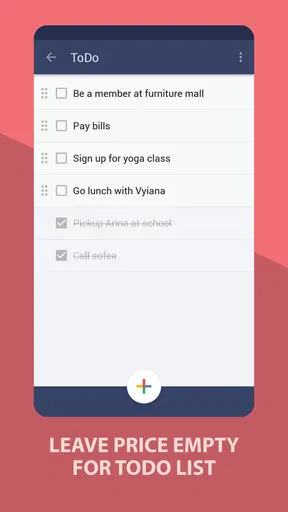
Usability is where BudList truly shines. The app is designed with simplicity in mind, ensuring that even the least tech-savvy among us can navigate with ease. I appreciated the drag-and-drop functionality that lets you rearrange items within your list. Plus, the option to strike through items as you add them to your cart provides a satisfying sense of accomplishment.
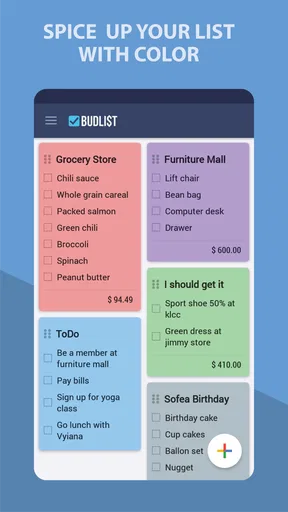
Visually, the app is a treat. The layout is minimalist, avoiding the clutter that plagues many similar apps. The color scheme is easy on the eyes, and the icons are both functional and cute. It’s clear that a lot of thought went into making the app not just useful, but also visually appealing.
Extra Perks
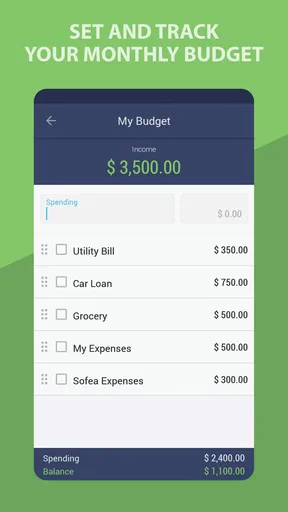
One of the features that I found surprisingly useful was the built-in budget tracker. You can set a budget for your shopping trip and the app will keep a running total of your items. This has saved me from more than a few impulse buys, keeping me on track financially.
The app also offers a barcode scanner for adding items, which is a nifty little tool for those who prefer to shop with precision. Just a quick scan, and boom, the item is on your list. It’s these little touches that make BudList feel like a premium experience.
Room for Improvement
While I’m a big fan of the app, no tool is perfect. For instance, the catalog, while extensive, can sometimes feel a bit too broad. I found that some niche items weren’t listed, leaving me to add them manually. Also, while the sharing feature is fantastic, it would be even better with real-time updates when someone else modifies the list. Right now, it requires a refresh to see changes.
Conclusion
Overall, the Grocery Shopping List - BudList is a game-changer for anyone looking to streamline their shopping experience. It takes the stress out of meal planning and ensures you never forget that crucial ingredient again. Whether you’re shopping for a family or just yourself, this app is worth a spot on your home screen. Give it a try, and you might find yourself looking forward to your next grocery run. Now, if only it could do the shopping for us too!
Where it fits among shopping-list apps
Compared with a note-taking app or a paper list, BudList offers more structure: the grocery catalog, categories, quantities, priorities, and notes can make a long shop easier to scan. A plain note may still be better if you want the fewest possible steps, especially for a short run where you only need to remember two or three things. I would choose BudList when a recurring household list needs more detail, not simply because a digital list is automatically better.
It also sits apart from retailer-specific shopping apps. Those can be a better fit when the main goal is ordering from one store or handling the purchase inside that store’s service. BudList’s described role is organizing what to buy, so I see it as a companion to a shopping trip rather than a replacement for a supermarket’s ordering and checkout tools. If you shop at several places and want a general list, that distinction may be useful; if you need store inventory or delivery coordination, a retailer app is likely the more relevant tool.
Small workflows that make the list more useful
I would use categories before I use priorities. Categories help me move through a shop in a sensible order, while a priority marker is most valuable for the few items that genuinely cannot wait. Marking everything as urgent removes the point of prioritizing. Likewise, quantities are worth adding for ingredients shared across a meal plan: “tomatoes” is less helpful than a note that says how many are needed or what they are for.
The catalog and manual entry work best as a pair. I would start with the catalog for familiar staples, then enter unusual products in my own words rather than spending time searching for a perfect match. The useful trade-off is speed versus precision: a catalog choice can make repeat additions quicker, while a carefully written manual entry is clearer for a specialty ingredient. For an item someone else must recognize, a short note can prevent a needless substitution.
Smart suggestions are most helpful when shopping habits are steady. If I buy the same breakfast basics every week, prompts can jog my memory before I leave home. They are less useful for occasional recipes or changing tastes, so I would still check the list against the meals I actually plan to cook. Suggestions can remind me; they should not decide what belongs in the basket.
Budgeting without treating an estimate as a promise
The built-in budget tracker can give a shop some structure, particularly when I set a limit before browsing and use the running total as a prompt to reconsider extras. I would not treat any planned total as a guaranteed checkout amount: prices can vary, and the usefulness of a running figure depends on entering the items and costs accurately. For a strict budget, I would leave room for essentials whose final cost is uncertain and check the total as I shop.
The barcode scanner is a different kind of convenience. It makes sense when I want to add a specific packaged product rather than type its name, but it is not the quickest answer for loose produce, unfamiliar items, or something I do not have in front of me yet. I would use it selectively, not make scanning a required step for every entry. A simple written item is often enough.
Who is likely to appreciate it—and who may not
I can see BudList suiting a household that shares grocery responsibilities, a careful shopper who likes quantities and notes, or someone who wants recurring staples to be easier to remember. It may also help a new shopper follow a more experienced person’s instructions without relying on a string of last-minute messages. Its value is in reducing forgotten details and making a list legible to the person who is actually shopping.
I would skip it if my only need were a temporary reminder, if I strongly preferred paper, or if I expected a list app to handle meal planning, household permissions, or online ordering as one integrated system. It is also a less natural fit for shoppers who do not want to maintain categories or item details. In those cases, the simplest notes app—or a store’s own app when ordering is the priority—may involve less friction.
Cost, compatibility, and a sensible trial
BudList is free to install, with in-app purchases listed at $3.49 per item. I would begin with the free experience and decide whether any paid item matters to my routine rather than assuming I need to buy something. The app is currently at version 3.30 and requires Android 6.0 or later, details worth checking against an older device before building a household routine around it. It is rated Teen, which is relevant for families deciding whether it suits a young person’s phone.
Its average rating is 4.4 from 882 ratings, with 68 written reviews and over 10K installs. Those figures suggest it has found an audience, but they cannot tell me whether its particular workflow suits my household. I would test one ordinary shop first: add a few staples, include a quantity or note where needed, and see whether everyone who needs the list can use it comfortably.
A practical household verdict
My overall view is that BudList is most convincing as a shared reminder and shopping organizer, not as a complete system for running a home. It can make the handoff between “we need this” and “someone is going to the store” clearer, provided the household keeps entries specific and expectations about sharing realistic. The catalog, list organization, budget tracker, and barcode option give it more substance than a bare checklist, while manual entries keep it usable when the catalog does not match a niche purchase.
For a single shopper, the same tools can make a regular grocery run less scattered. For several shoppers, I would first confirm the list-sharing experience on the devices involved and agree on how to handle checked items, substitutions, and spending limits. The app will not settle those household decisions for you, but a clear routine can make its list genuinely useful. If that is the kind of help I need, I would give it a try; if I want store ordering or formal family controls, I would choose a tool built around those needs instead.
Pros
- Intuitive and user-friendly interface.
- Syncs seamlessly across multiple devices.
- Customizable categories for easy sorting.
- Supports barcode scanning for quick entry.
- Offline mode available for shopping without internet.
Cons
- Limited free version features.
- Occasional ads in the free version.
- No recipe integration feature.
- Barcode scanning requires premium.
- Lacks direct price comparison options.
FAQs for Grocery Shopping List -BudList
What features does Grocery Shopping List - BudList offer to help manage my grocery list?
Grocery Shopping List - BudList provides a variety of features designed to simplify your shopping experience. Users can easily create, edit, and organize grocery lists with options to categorize items and set priorities. The app includes a barcode scanner for quick item entry and price comparisons, as well as sharing capabilities to collaborate with family members or roommates.
Is Grocery Shopping List - BudList available on both Android and iOS devices?
Yes, Grocery Shopping List - BudList is available for both Android and iOS platforms. Users can download it from the Google Play Store for Android devices and the App Store for iOS devices. This cross-platform availability ensures that you can use the app seamlessly across different devices, making grocery management convenient and accessible.
Does the app require an internet connection to function?
Grocery Shopping List - BudList is designed to work both online and offline. While an internet connection enhances functionality—like syncing lists across devices and accessing real-time price updates—the core features, such as creating and managing lists, are fully functional without internet access, ensuring that your grocery planning is not disrupted.
How does Grocery Shopping List - BudList handle user data and privacy?
Grocery Shopping List - BudList prioritizes user privacy and data security. The app requires only minimal personal information for account creation and does not share user data with third parties without consent. It employs encryption to protect data and offers users the ability to manage their privacy settings, ensuring a secure and trustworthy experience.
Are there any in-app purchases or subscription fees associated with Grocery Shopping List - BudList?
Grocery Shopping List - BudList offers a free version with basic features. However, users can opt for a premium subscription that unlocks additional features such as advanced list management, ad-free experience, and enhanced sharing capabilities. The pricing for the premium version is competitive and offers good value for users seeking more robust functionality.


